Crypto Cards With Apple Pay and Google Pay: Which Ones Work
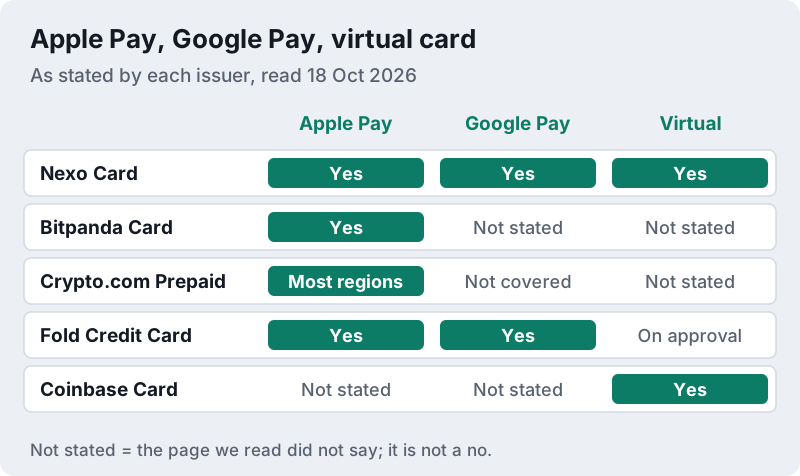
Most mainstream crypto cards now work with a phone wallet, but not all of them with both. On the issuers' own pages read on 18 October 2026, the Nexo Card supported Apple Pay and Google Pay and issued a virtual card you could add to your wallet straight away; the Fold credit card promised instant provisioning to both; Bitpanda named Apple Pay only; and Crypto.com's help centre listed Apple Wallet for its prepaid card in the US, Canada, the EU, Australia and Singapore, but not the UK or Bahrain.
A phone wallet changes how the card number is handled, not what happens to your crypto. With Apple Pay, the merchant never receives your real card number, which is a genuine security gain. But each tap still spends the balance behind the card, and if that balance is crypto, the issuer sells it at the moment of purchase. In the US that sale is a taxable disposal, so a contactless coffee can still create a gain or loss to report. Support differs by card, country and tier, so check your issuer's page before relying on it.
Which crypto cards work with Apple Pay and Google Pay (dated)
The table lists what each card's own page or help centre said on 18 October 2026. Where a page did not mention a wallet, we say not stated rather than guess, because a missing line on a marketing page is not proof either way. We left out cards whose pages we could not read for wallet support that day.
| Card | Region | Apple Pay | Google Pay | Virtual card |
|---|---|---|---|---|
| Nexo Card | Selected European countries | Yes | Yes | Yes, once your account holds $50 |
| Bitpanda Card | Euro-area residents | Yes | Not stated | Not stated |
| Crypto.com Prepaid Card | US, Canada, EU, Australia, Singapore | Yes (Apple Wallet); not in the UK or Bahrain | Not covered by the help article | Not stated |
| Fold Credit Card | US | Yes, instant provisioning | Yes, instant provisioning | Card provisioned to wallets on approval |
| Coinbase Card | US | Not stated on its card page | Not stated on its card page | Yes, create a virtual card |
Card by card: Nexo, Bitpanda, Crypto.com and Fold
Nexo Card
Nexo's card page describes the fastest route of the group. You open the Card tab in the app, tap Activate Card to issue a virtual card, choose Add to Wallet and can pay with Apple Pay or Google Pay right away. The virtual card can be activated once your Nexo account holds at least $50. The physical card is stricter: it needs an account balance above $5,000 in digital assets and at least the Gold loyalty tier. Nexo says the card is available only in selected European countries, after identity verification.
Affiliate link. We may earn a commission — it never moves a ranking.
Bitpanda Card
Bitpanda's card page invites you to pay contactless with Apple Pay and spend your assets from your phone, and does not mention Google Pay. To order one you need a verified account and an address in a country that uses the euro, and its fee table shows no monthly cost and a €0 Bitpanda fee on non-euro spending, though the page adds that Visa mark-up fees apply. Each purchase converts your chosen asset to euros at the moment you pay, so the crypto-sale mechanics apply exactly as they would with the plastic card.
Affiliate link. We may earn a commission — it never moves a ranking.
Crypto.com Prepaid Card
Crypto.com's help article on Apple Wallet answers by region: yes in the US, Canada, the EU, Australia, including New Zealand users, and Singapore; no for the United Kingdom, or for Bahrain and select Gulf markets. You can add the card from the Wallet app or from the Card section of the Crypto.com app. The article covers the prepaid card; it does not address the US credit card, so check that card's terms separately.
Affiliate link. We may earn a commission — it never moves a ranking.
Fold Credit Card
Fold, a US bitcoin rewards credit card, says it offers quick decisions and instant provisioning to Apple Pay and Google Pay. As a credit card it involves a credit check and a Fold account. Fold is not on our partner list and pays us nothing; we include it because it is one of the few US crypto cards whose page names both wallets.
How a phone payment works with a crypto card
Apple's security overview explains what the wallet adds. When you add a card, the issuer creates a device-specific Device Account Number, encrypted and stored in your phone's Secure Element; Apple does not store your original card number. When you pay, the phone sends that Device Account Number with a one-time dynamic security code, so neither Apple nor your device passes on your actual card number. A leaked receipt or a compromised shop terminal is far less useful to a thief.
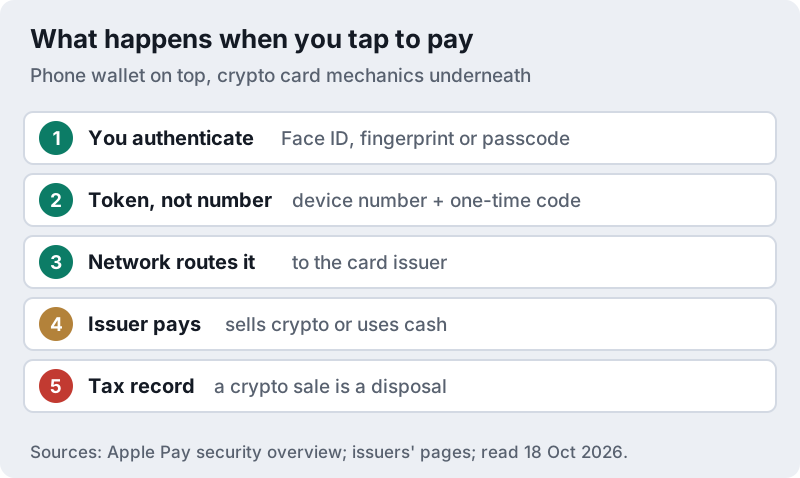
Everything after that step is ordinary crypto card mechanics. The network passes the payment to the issuer, and the issuer funds it from your balance. If that balance is held as crypto, it is sold for the purchase amount, as the flow below shows.
A plain bank debit card spends money you already hold, so there is nothing to tax. A crypto card spends an asset — which is why record-keeping matters. This is educational, not tax advice; rules differ by country.
Two practical consequences follow. Your phone wallet is now the key to the card, so protect it with a strong passcode and lock it quickly if the phone is lost. And because many cards let you choose which asset pays, selecting a cash or stablecoin balance for small purchases can keep your spending record simpler; our guide to crypto card taxes explains why that matters in the US.
Choosing a card if you mainly pay by phone
If you live in the euro area and want both wallets, the Nexo Card states support for Apple Pay and Google Pay and lets you start with a virtual card; the Bitpanda Card suits iPhone users who want no Bitpanda fee on non-euro spending (Visa mark-ups still apply). In the US, Crypto.com's prepaid card lists Apple Wallet support. These are affiliate links; compare fees and catches in our best crypto card guide and the crypto card fees breakdown before you choose.
Edge cases
- Your card will not add to the wallet. Wallet support can depend on the region, tier and card type. Contact the issuer through its app rather than a phone number from a search result.
- You replace or upgrade the card. Crypto.com says you must add a reissued, replaced or upgraded card to Apple Wallet again; expect the same elsewhere.
- You travel abroad. The wallet works wherever contactless is accepted, but foreign-exchange fees still apply; see our crypto card for travel guide.
- You moved country. Regional availability changes; our crypto cards by region page explains why.
Crypto cards and phone wallets: common questions
Can I add a crypto card to Apple Pay?
Which crypto cards work with Google Pay?
Is there a virtual crypto card?
Is paying with a crypto card by phone safer?
Is using a crypto card with Apple Pay taxable?
New here? Start with the best crypto cards, gauged on rewards, fees and the staking catch, or read how crypto cards actually work.